Table of Contents
If you play Arc Raiders, you’ll surely remember this scene. You’re crouched in a dark corner, watching for enemy movements, your heart pounding, and you think no one can see you. Then, the backpack on your back, with its flashing light, reveals your true identity.
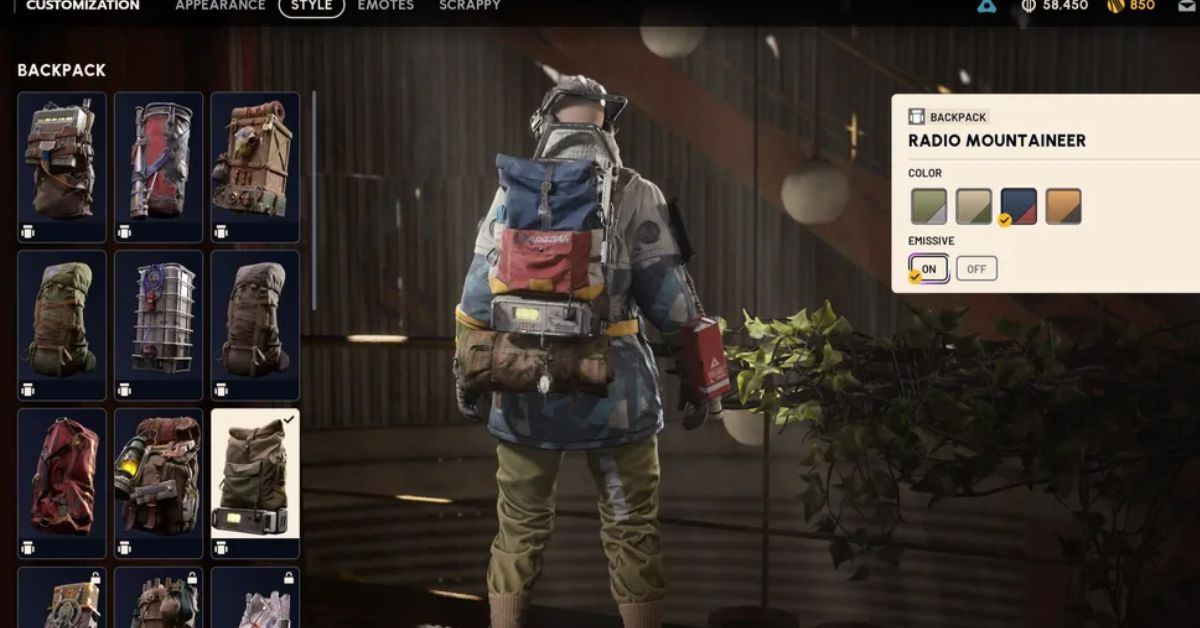
Many players have been struggling with this issue for a long time. Now, Embark Studios has provided a solution with the game’s major Frozen Trail 2.0 update. You can now turn off your backpack’s light yourself.
Read More: Deadlock City Never Sleeps Update: Valve’s Haunted 1950s New York Is a Setting Worth Exploring
What is the whole matter?
The Frozen Trail 2.0 update brings a lot of new features. But one small change that players have been asking for is the ability to turn the backpack light on and off.
This option is found in the cosmetic (customization) menu of each backpack and is named“Emissive”The backpack’s glow disappears when it’s turned off, and returns when it’s turned back on. The placement of the light on the backpack depends on the design of each backpack, so the effect will vary slightly from backpack to backpack.
An easy way to turn off your backpack’s light
Finding the setting doesn’t take much effort. Just follow these steps:
- In the game“Raider”Open the menu.
- in the lower left corner of the screen“Customization”Go to.
- given the above “Style”Select the tab.
- from the left“Backpack”Select.
- Emissiveto the option containingOffDo it.
As soon as you press the button, you’ll see changes in your character’s backpack. The light will disappear and return, depending on your toggle.
Read More: AI Driving Sim Dev Spends Over $1,000 a Day to Keep Teach My Little Sister How To Drive Demo Running
Why does this small change make a difference?
In a game like Arc Raiders, every little detail counts. You have to be wary of both enemy machines (ARCs) and other players simultaneously. A flashing light on your back made it very easy to get noticed, especially if you wanted to move stealthily.
Now you can be a little more “sneaky” by turning off the lights. This update is a real treat for stealth players.
One important thing is that there is another side to this.
Every coin has two sides, and that’s the case here. While turning off the lights can help you avoid being seen by others, your character may be a little more difficult to see in the darkest areas of the game. Keep this in mind if you’re playing with teammates, as the glow can sometimes help them pinpoint your location.
Therefore, it’s wise to make the decision based on your playstyle. If you’re looking to stealthily collect loot alone, turn off the lights. If you’re looking to coordinate with a team, it’s probably better to keep them on.
Read More: Etre: Control-Inspired Action Game Set Inside a Planet-Scale Alien Mind Stuns With Its Art Style
What else is special in Frozen Trail 2.0?
The backpack light is just one small part. According to PC Gamer’s coverage, the Frozen Trail update is much larger than expected. It reportedly includes new ARC enemies, weapon upgrades, a new map, and a personal outpost that can be decorated. One reviewer who tried it out spent most of his time playing with the new grapple hook.
This means Embark Studios has added a lot of new things to the game, while also addressing long-standing player complaints. The light toggle is a good example of this.
Our opinion
Sometimes the greatest joy in a game isn’t found in big features, but in the small changes you’ve been waiting months for. The option to turn off your backpack’s light is just that. It’s small, but it has a big impact on the gaming experience.
If you haven’t played the Frozen Trail 2.0 update yet, open the game, go to Customization, and try it out for yourself. And yes, let us know in the comments below whether you’d prefer the lights off or on?